
Payment Link
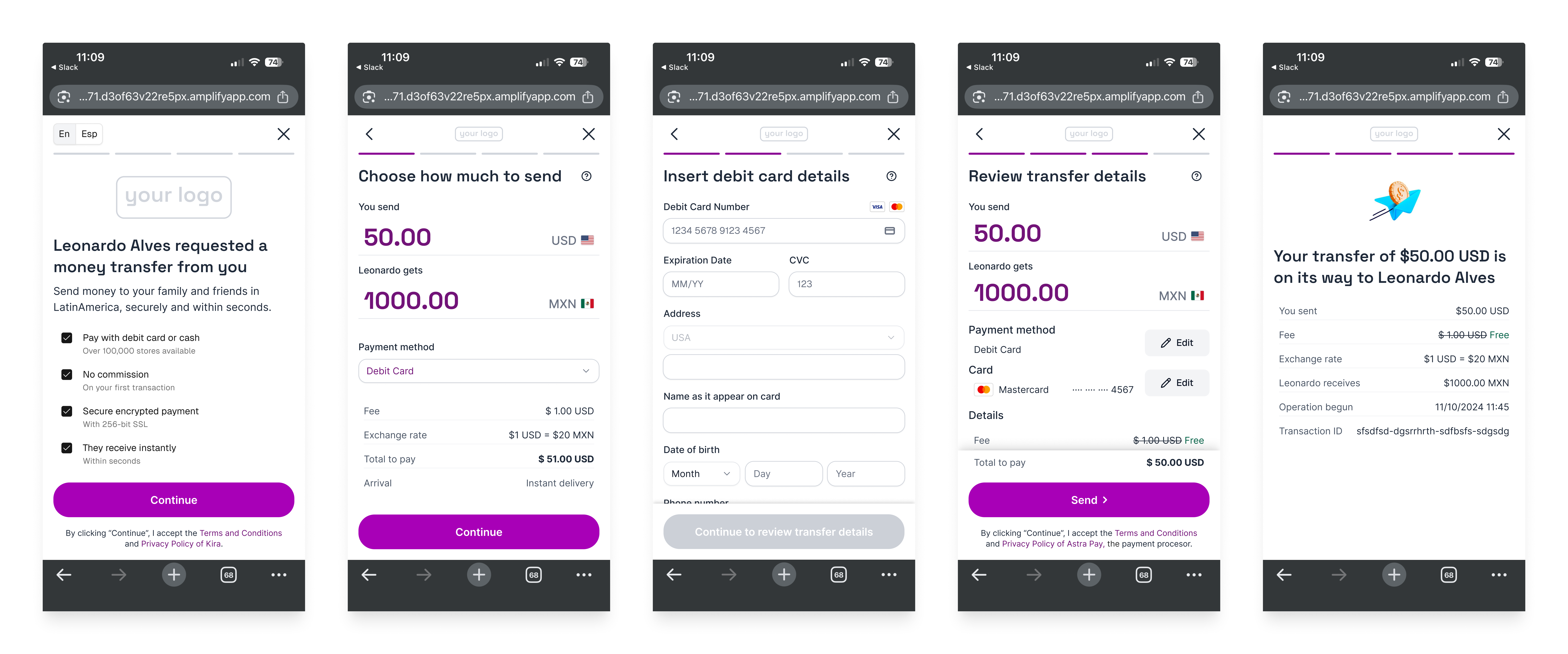
The Payment Link simplifies international payment requests by allowing recipients to share a link with their contacts in the United States.
- This U.S. contacts (senders/users) complete the transfer to the recipient through the provided link.
- Whether the recipient is a business or an individual, they receive the payment funds directly into their wallet or bank account.
This functionality requires no more than 2 API calls on your side, which generates a payment link customized with your brand, while Kira manages all sender-related processes, including KYC verification, payment details, and payment processes.
Key Features
- Accept cash payments at + 90,000 stores across the United States by generating a barcode that can be presented at participating stores. This payment method is available in most U.S. states, except New York and Louisiana.
Participating cash-payment stores
- Walgreens
- CVS
- Dollar General
- Kroger
- Office Depot
- Rite Aid
- Love’s
- Office Max
- Ralphs
- Walmart *(Note: At Walmart the users need to show a US id and pay at the Customer Service section, not at the regular checkout).
- Accept online payments with US Visa and Mastercard debit cards. This payment method is available in most U.S. states, except New York and Alaska.
- Send funds to individuals or businesses.
- Send funds to Solana wallets anywhere or to bank accounts in Mexico, United States, El Salvador & Guatemala.
- Create single-use links that expire after the first payment or reusable links that can be used multiple times to send funds to the same recipient.
- Generate a payment link for a fixed amount or let the sender decide how much to pay.
- Set a payment amount limit by defining the maximum amount that can be paid through the link.
User KYC Requirements & Limits
Users (senders) located in the United States who make payments through a payment link are required to complete identity verification (KYC).
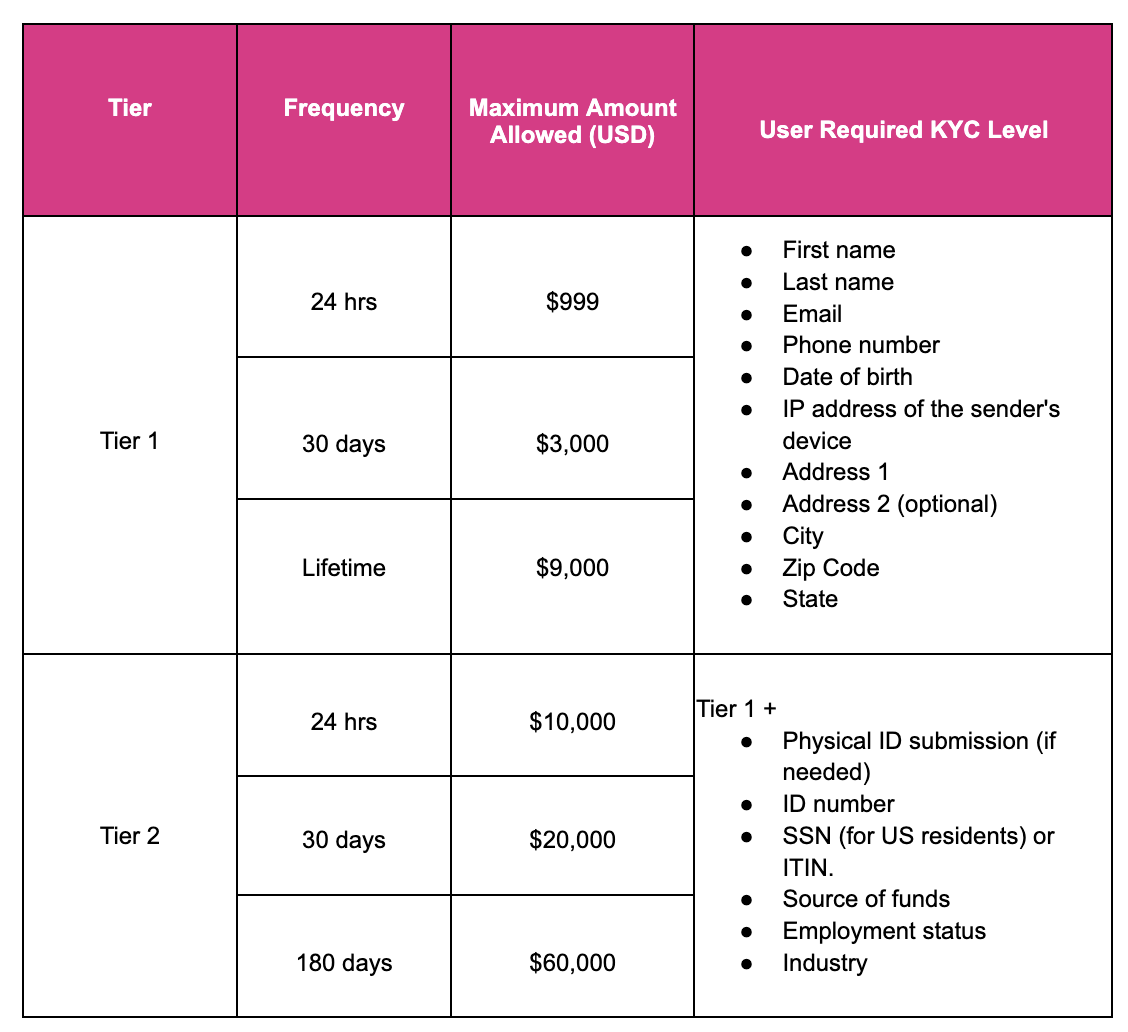
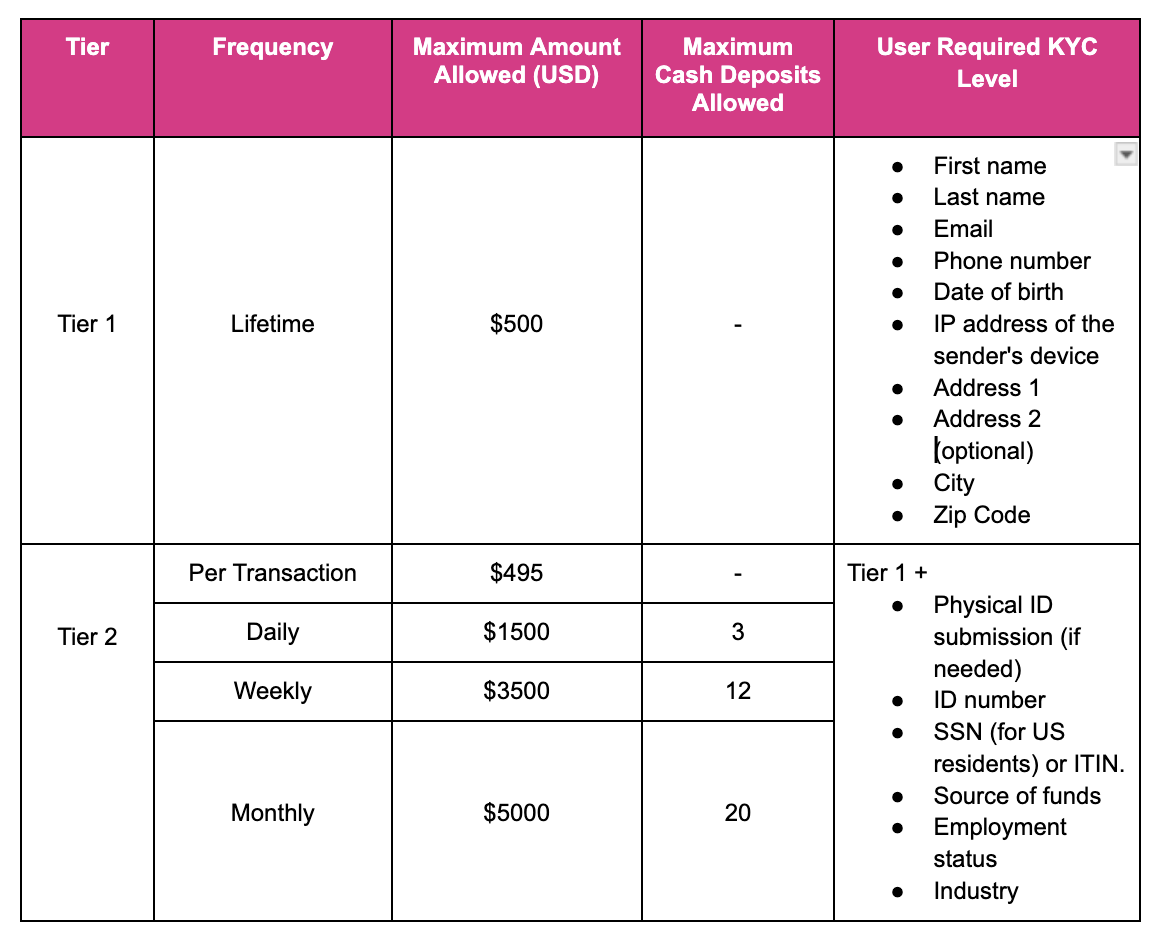
The level of KYC completed determines the user transaction limits, including both allowed amounts and frequency.
KYC Levels
Kira supports two tiers of user identity verification: Simplified KYC and Full KYC.
- Tier 1 - Simplified KYC: Requires basic user details such as full name, email, date of birth, and address. It’s completed during the first payment and allows card and cash transactions up to limited amounts within a set period.
- Tier 2 - Full KYC: Requires additional details such as ID number, source of funds, employment status, industry, SSN (for U.S. residents) or ITIN, and sometimes physical ID submission. It is requested when a user’s cash or card transactions exceed the limits allowed under the Simplified KYC tier. Once completed, it does not need to be repeated and increases the sender’s transaction limits.
Card KYC Tiers and Limits
Cash KYC Tiers and Limits
Payment Flow
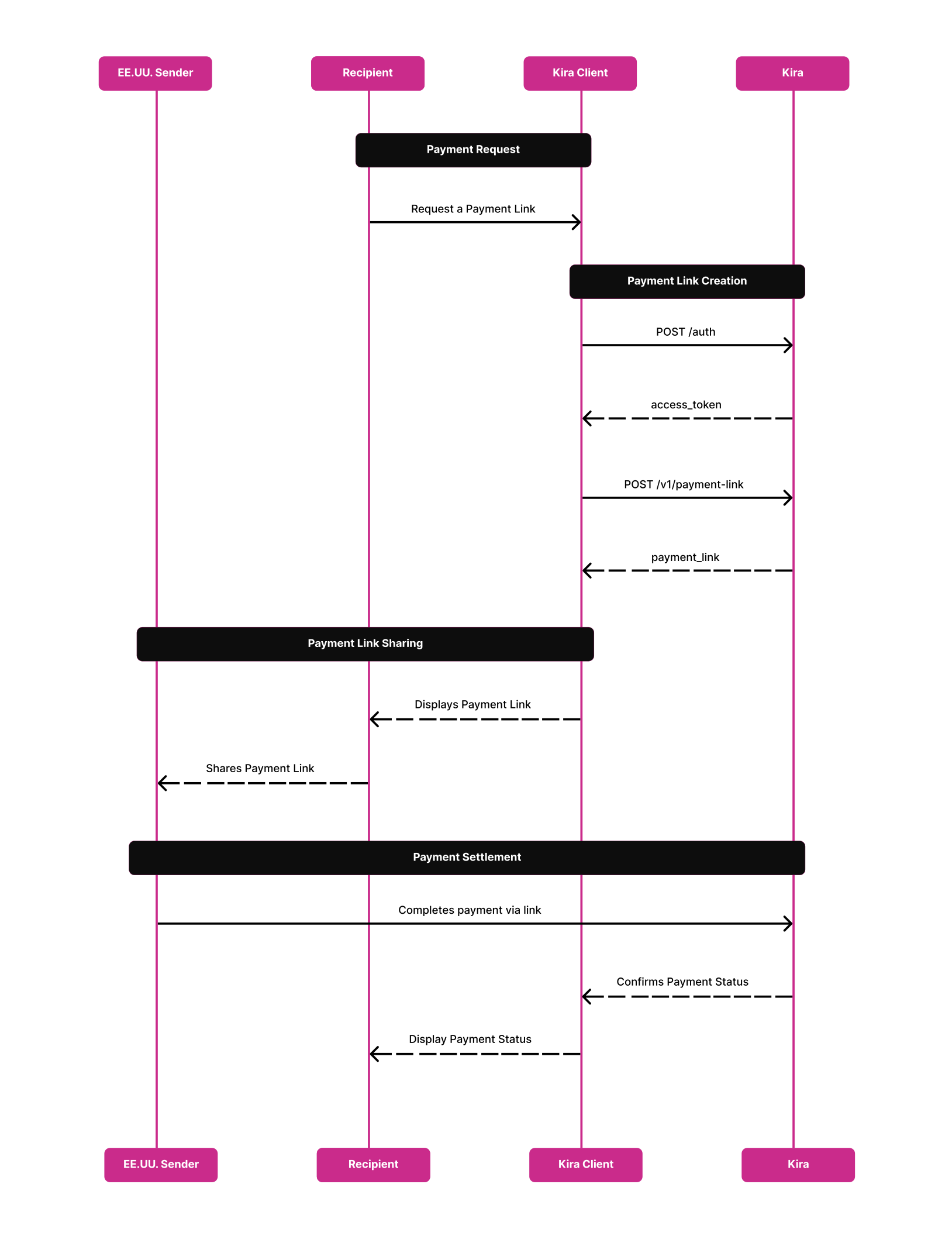
- The recipient requests a payment link through your service.
- You authenticate to authorize your API calls by sending a
POST /authrequest. - You receive an
access_token. - You call the
POST /v1/payment-linkendpoint using theaccess_tokento generate a payment link. - The
payment_linkis returned in the response. - You display the payment link to the recipient.
- The recipient shares the payment link with the U.S. sender.
- The U.S. sender completes the payment using the link.
- Kira returns the payment status to your system.
- The funds are sent to the recipient’s wallet or bank account through one of the following options:
- Direct Settlement: Kira sends the funds directly to the recipient’s bank account or wallet.
- Indirect Settlement: Kira transfers the funds to your designated wallet or bank account, and you handle the settlement to the recipient's wallet or bank account. In this case, a reconciliation process must be agreed upon in advance.
- The recipient receives the funds in their bank account or wallet.
Payment Link FAQs
-
What is the Payment Link?
Is a URL that recipients can use to request international payments seamlessly from their contacts in the US.
-
How does the Payment Link simplify international payment requests?
Recipients can share a generated link with their contacts, enabling US senders to complete transactions directly through the link to the recipients accounts, thereby streamlining the payment process.
-
Which payment methods are currently supported by the Payment Link?
Cash and debit card payments.
-
Can the payment link be used to send payments to individuals and businesses?
Yes, the payment link can be used to complete payments to both individuals and businesses.
-
What KYC requirements are associated with the Payment Link?
This depends on the transaction history of the sender. If the sender’s transactions remain below certain limits, they will only need to provide basic information once. However, if they exceed those limits, they will be required to submit additional information to increase their transaction limits. Kira handles this process via the payment link.
-
How are funds received through the Payment Link?
We can support two ****flows to settle the funds to the recipient's bank account or wallet:
- Direct Settlement: Kira sends the funds directly to the recipient’s bank account or wallet.
- Indirect Settlement: Kira transfers the funds to your designated wallet or bank account, and you handle the settlement to the recipient's wallet or bank account. In this case, a reconciliation process must be agreed upon in advance.
-
What is required to generate a Payment Link via API?
Only one API call with the recipient details is necessary to generate a customized payment link.
-
Which retail locations support cash payments?
Walgreens, CVS, Dollar General, Kroger, Office Depot, Rite Aid, Love’s, Office Max, Ralphs and Walmart (Note: At Walmart the users need to show a US id and pay at the Customer Service section, not at the regular checkout).
-
Who manages the sender-related processes in the Payment Link?
Kira manages all sender-related processes, including KYC verification, payment details, and payment processing.
-
Can recipients request payments from contacts in countries other than the U.S.?
Currently, the Payment Link is designed to receive payments from contacts only in the U.S.
-
Is branding customization available for the Payment Link?
Yes, the generated payment link can be customized with your brand colors and logo. Fees, texts and payment methods can also be customized.
-
Who determines the payment amount in the Payment Link?
There are two configuration options:
- The recipient can define the desired amount to be received. In this case, you must include the
amountfield in the payload when generating the link. This amount will be assigned to the payment link. - The sender can choose the amount to send. To enable this, simply leave the
amountfield empty in the payload. The sender will then be prompted to enter the amount when opening the link.
- The recipient can define the desired amount to be received. In this case, you must include the
-
How can I ensure the recipient does not receive more than the allowed limit defined by my company?
If your company has recipient-specific receiving limits, you can enforce them by setting the
max_amountparameter in the payload. This will cap the maximum amount that can be received through the Payment Link. For example, if a recipient is only allowed to receive $50 USD more, settingmax_amount: 50in the payload will prevent the sender from completing a payment above that threshold. -
Can I use the Payment Link to send funds to a wallet?
Yes, Kira supports sending funds to a wallet using the Payment Link product.
Updated 12 days ago